Three ways to play
Against the CPU at three levels (easy, normal and hard), against a friend on the same keyboard or with gamepads, or online with a room code or an invite link.
Footvolley game
A 1v1 arcade footvolley game in 3D, with the speed of Windjammers, on a walled padel-style court. Play the CPU, a friend on the same keyboard or online with a room code.
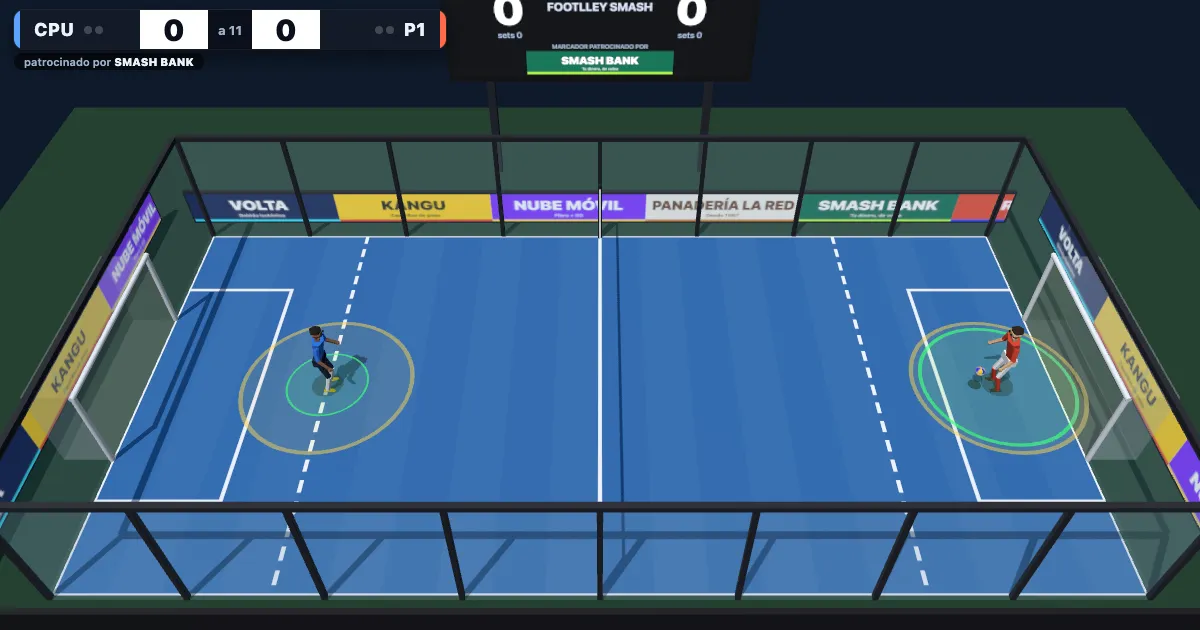
Footvolley with the speed of Windjammers: two players, one ball and a closed court.
Against the CPU at three levels (easy, normal and hard), against a friend on the same keyboard or with gamepads, or online with a room code or an invite link.
Press a shot button with the ball in reach to control it, hold to charge the shot and release to fire. Releasing in the golden band gives a perfect shot.
The direction you hold when you release picks the side of the court, and pushing towards the net shortens the shot.
Three shots and a dash to reach a ball at the last moment. The curve bends the ball in the air, and the shots are worked out so the ball bounces where you aimed.
The court is closed by glass walls, as in padel, and the ball stays in play off them. There is a goal at each end, and inside your small area you can catch the ball with your hands and volley it out.
A fault, the net, a ball out or a double bounce is one point for the rival; a goal is three. Sets go to 11, and the first to two sets wins.
The Player 2 keys are for two people sharing one keyboard. Any key or button can be changed from the menu, and F1 opens a panel to tune the game live (not online).
| Player 1 | Player 2 | Gamepad | |
|---|---|---|---|
| Move | WASD | Arrow keys | Stick or D-pad |
| Drive | J | , or Num1 | A |
| Lob | K | . or Num2 | B |
| Curve | L | - or Num3 | X |
| Dash | Space | Right Shift or Num0 | RB or Y |
| Pause | Esc | Backspace | Start |
The host picks a side and gets a five-letter code and a link. A signalling server introduces the two browsers, and from then on they talk directly over WebRTC.
Each browser sends only its inputs and simulates a tick when it has both. The simulation is deterministic, so the same inputs give the same match. Every 60 ticks the two compare a hash of the state, and if they differ, the host sends a snapshot and play goes on.
If the connection drops, the match freezes and the guest has 30 seconds to come back. If either player hides the tab, the match pauses on both sides. The ping and the input delay are shown in the corner.
Math.sqrt instead of Math.hypot, which can differ in its last bit between browsers and would make two players' matches drift apart.What Footlley Smash doesn't do, so you can decide before you start.
Yes. It runs in your browser with no download and no account, and it shows no ads yet. It uses Google's consent banner and, if you accept statistics cookies, Google Analytics, as the privacy policy explains.
A fault, a ball in the net, a ball out or a double bounce gives the rival one point. A goal is worth three. A set is played to 11 points, and the first player to win two sets wins the match.
Yes. Player 1 uses WASD and J, K, L and Space; player 2 uses the arrow keys with , . - and right Shift, or the numeric keypad. Gamepads work too: in the menu, every keyboard and gamepad picks a side, and the side nobody picks is played by the CPU.
Choose Online in the menu. Whoever creates the room picks a side and gets a five-letter code and a link; the other player types the code or opens the link. After the first contact through a matchmaking server, the two browsers talk to each other directly. When the match ends, both press R for a rematch.
The match freezes and says it is reconnecting. The guest has 30 seconds to get back into the room, and play resumes after a three-second countdown. If someone switches tabs, the match pauses on both sides. If the host reloads the page, the match is lost.
Not yet. There are no touch controls, so you need a keyboard or a gamepad.
Yes, from the menu, for both keyboards and for gamepads. Your controls and the CPU level are saved in your browser.
Use the contact form. Tell us the mode (CPU, two players or online), whether you were on a keyboard or a gamepad, your browser, and what happened.