How Andamio Works: A Gantt Editor With No Backend
Andamio is a Gantt editor that runs in the browser. It has no server of its own and no accounts, and it keeps your plans in your browser’s localStorage. Until September 2026 it was called Project Manager; the app now lives at andamio.vedratic.com. The old address still works and keeps the plans saved there; to move them, export them as JSON and import them at the new address.
This post is about how it’s built: the data model, the function that turns tasks into dates, the three views, and the Mermaid format we use to get plans in and out. We cover what it doesn’t do as well, because several of those limits come straight from the design.
The stack and the history
Andamio is React 19 with TypeScript, built with Vite and styled with Tailwind. Dates go through date-fns, and the Mermaid view uses the mermaid package (version 11). The build is a folder of static files, served from Cloudflare Workers as plain assets.
The first commit is from 13 March 2026. On 30 April 2026 the project was reworked into a standalone Mermaid Gantt editor, and the Cloudflare configuration arrived on the same day. Everything below describes the code as it is now.
One flat list of tasks
A plan is a Project: a title, a start date, an optional target end date and an array of tasks. Phases, deliverables and milestones aren’t separate structures. They are tasks with a different type, and nesting is expressed with a parentId. From src/types.ts, these are the fields that matter for scheduling:
export interface Task {
  id: string;
  name: string;
  type: TaskType | string;
  parentId?: string;
  description?: string;
  effort: number; // days
  timespan: number; // days
  buffer: number; // days
  validationComplexity: number; // 0 to 2 (multiplier for back and forth)
  dependencies: string[]; // task ids
  // ...status, manualOffset, targetEndDate and a few UI fields
}
A flat list with parent pointers is easy to store, easy to export as JSON and easy to edit: moving a task into a deliverable only changes one field. The tree is rebuilt every time the schedule is calculated.
State lives in a small hook, useProjects. It holds every project in React state and writes the whole array to localStorage under the key gantt_projects whenever it changes. There’s no reducer, no debounce and no sync layer. We explain why localStorage, and what it costs, in localStorage or IndexedDB.
From tasks to dates: repeat until nothing moves
All the date logic is in one function, calculateSchedule in src/utils/scheduling.ts. It starts by giving each task a length:
const baseDuration = Math.max(t.effort || 0, t.timespan || 0);
const validationComplexity = t.validationComplexity || 0;
const validationDuration = Math.ceil((t.effort || 0) * validationComplexity);
const buffer = t.buffer || 0;
const duration = (t.type === 'Milestone' || t.type === 'Deliverable') ? 0 : baseDuration + buffer + validationDuration;
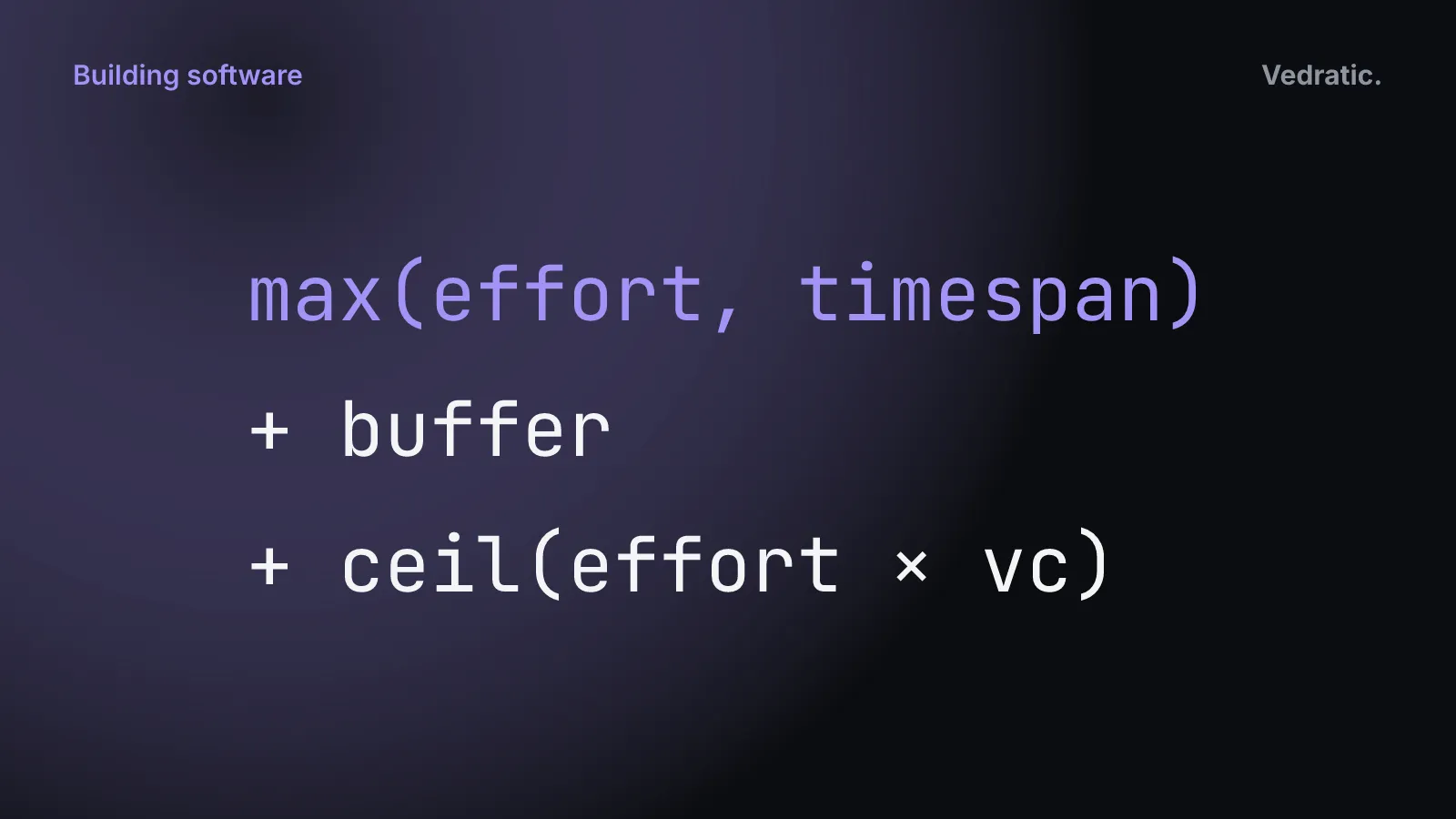
So a task lasts max(effort, timespan) + buffer + ceil(effort × validation complexity) days, and milestones and deliverables last zero. Then comes the part that places tasks in time. This excerpt is lines 53–79 of the same file, unchanged:
let changed = true;
let iterations = 0;
while (changed && iterations < 1000) {
  changed = false;

  const applyPush = (task: ScheduledTask, parentPushAmount: number) => {
    let maxDependencyEnd = 0;
    for (const depId of task.dependencies || []) {
      const depTask = taskMap.get(depId);
      if (depTask && depTask.endOffset > maxDependencyEnd) {
        maxDependencyEnd = depTask.endOffset;
      }
    }

    const myStart = Math.max(parentPushAmount, maxDependencyEnd + (task.manualOffset || 0));

    if (task.children.length === 0) {
      if (task.startOffset !== myStart) {
        task.startOffset = myStart;
        task.endOffset = task.startOffset + task.duration;
        changed = true;
      }
    } else {
      task.children.forEach(c => applyPush(c, myStart));
    }
  };
  rootTasks.forEach(t => applyPush(t, 0));
Each pass walks the tree. A task starts at the latest end among its dependencies, plus its manual offset, and never before its parent starts. After that, a second walk (updateParent) stretches each phase to cover its children and puts each deliverable or milestone where its last child ends. If anything moved, the whole thing runs again.
It is a fixed-point loop, not a topological sort. We don’t order the graph first; we keep pushing tasks forward until the dates stop changing. That has three consequences we can check by running the function:
- The order of the list affects how many passes it takes. Our test plan was two parallel chains ending in a milestone. With tasks listed in dependency order, it settled in 2 passes (one to place everything, one to confirm nothing moves). With the same tasks listed backwards, it took 5, because each pass could only push the chain one step further.
- Nesting comes for free. A dependency on a phase pushes every task inside it, because the phase’s start is passed down as
parentPushAmount. Phases inside phases work the same way. - The 1,000-pass cap is what stops a circular dependency. The editor doesn’t detect cycles. If A depends on B and B on A, every pass pushes both a bit further. With two 5-day tasks, the loop stopped at the cap with both tasks about 10,000 days after the start date. The page doesn’t freeze, but the chart makes it obvious something is wrong.
What the function doesn’t do is also worth saying. There’s no backward pass, so there is no slack and no critical path. Dependencies are finish-to-start only. Days are calendar days: weekends are shaded in the chart but not skipped. We go through what that means for planning in the critical path post.
We haven’t timed calculateSchedule on large plans, so we won’t give you a number. Each pass visits every task and dependency once, and the number of passes grows with how far the list order is from the dependency order. Measuring rendering cost is the subject of our profiling post.
Three views of the same plan
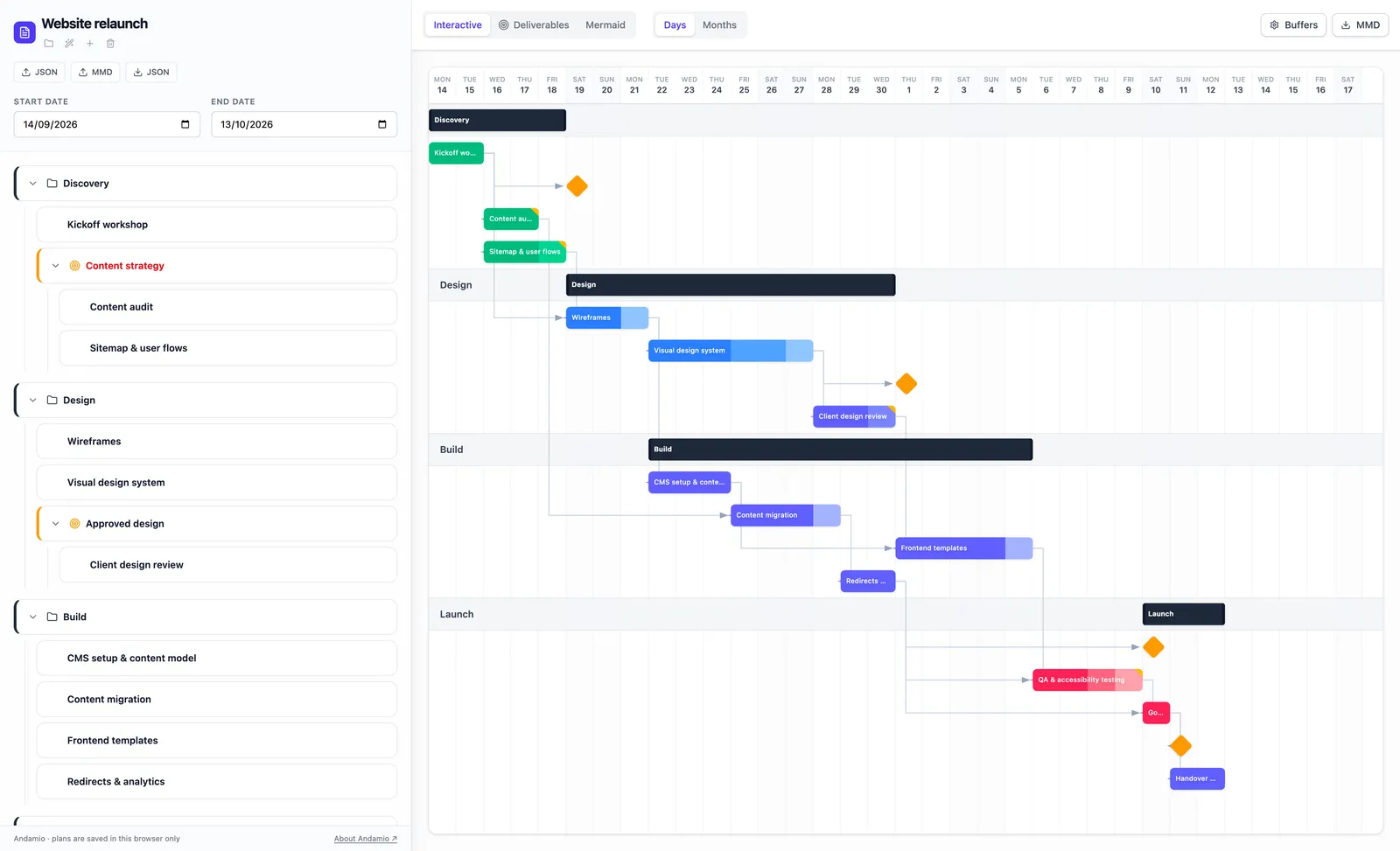
The toolbar in src/App.tsx switches between three views. All of them read the same project and the same schedule.
Interactive. The task list on the left and the chart on the right. You can drag a bar to move it, which sets its manual offset, and drag its edges to change effort and timespan. Round handles on each bar let you draw a dependency to another bar. Each bar is split into three blocks: the base duration, the validation time (striped) and the buffer (dotted). The tooltip shows the same breakdown in days. The chart has a days scale and a months scale.
Deliverables. A list of the plan’s deliverables, each with a description, an optional target end date and the tasks linked to it. If the calculated date is later than the target, the card says “Overdue by N d”. You link tasks to a deliverable from the Interactive view.
Mermaid. The plan as a Mermaid Gantt chart, rendered by the mermaid library, with a button to download it as .svg.
Mermaid in, Mermaid out
Mermaid’s Gantt syntax is plain text, and GitHub and Notion render it. That makes it a good way to get a plan out of Andamio. generateMermaid in src/mermaidService.ts writes one section per phase and one line per task, with after for dependencies and the task’s full length in days. Statuses become Mermaid tags: In Progress is active, Done is done and Blocked is crit.
parseMermaid goes the other way. It reads a .mmd or .txt file and keeps the title, turns sections into phases, and keeps each task’s duration, its after dependency and the active, done, crit and milestone tags. Mermaid has no words for buffers or validation complexity, so those start at zero.
Mermaid is a simplified copy of the plan, and while writing this post we found it’s lossier than we’d like:
- Manual offsets aren’t exported, only the
afterdependency. - Only tasks placed directly inside a phase are exported. A task nested inside a deliverable inside a phase doesn’t appear. The starter project has one, “Architecture Design”.
- A deliverable is exported as a zero-length milestone. Unless it has dependencies of its own, it lands on the project start date, not where its tasks end.
- On import, durations are read as whole days, so
1wbecomes 1 day and4hbecomes 4 days. Anafterwith two task ids is read as a single id.
JSON has none of these problems. The export is the Project object as it is, and importing it back gives an identical plan (under a new project id). That’s why JSON is the format to keep, and Mermaid is the one to share.
What there is no server for
With no backend, several things aren’t there: no accounts, no sharing link, no real-time editing, no history on a server. Sharing a plan means exporting a file and sending it. Andamio doesn’t send your plans anywhere, but the files that make up the app are still served from our host, and we come back to what that means in localStorage or IndexedDB.
The limits are listed on the Andamio page, and the functional side, what the buffer and validation fields are for, is in why your project needs buffer time built in.